MCP Apps, explained by building one
What the first official MCP extension changes about tool results, and what porting a production RAG agent into Claude, ChatGPT, and Cursor taught me about where it leaks.

Every MCP tool call ends the same way: text goes back to the model, and the model decides what the user sees. That has been the ceiling on the protocol since it shipped. You can build the best retrieval pipeline in the world behind a tool, and the last hop is still a language model paraphrasing your output into chat prose.
MCP Apps is the first official extension to the Model Context Protocol, and it removes that ceiling. A tool can now return an actual interface, rendered inside the conversation. I spent time porting a production RAG agent into it, running the same widget in Claude, ChatGPT, and Cursor from one codebase, so this is both an explanation of the extension and a field report on where it holds and where it leaks.
The problem it exists to solve
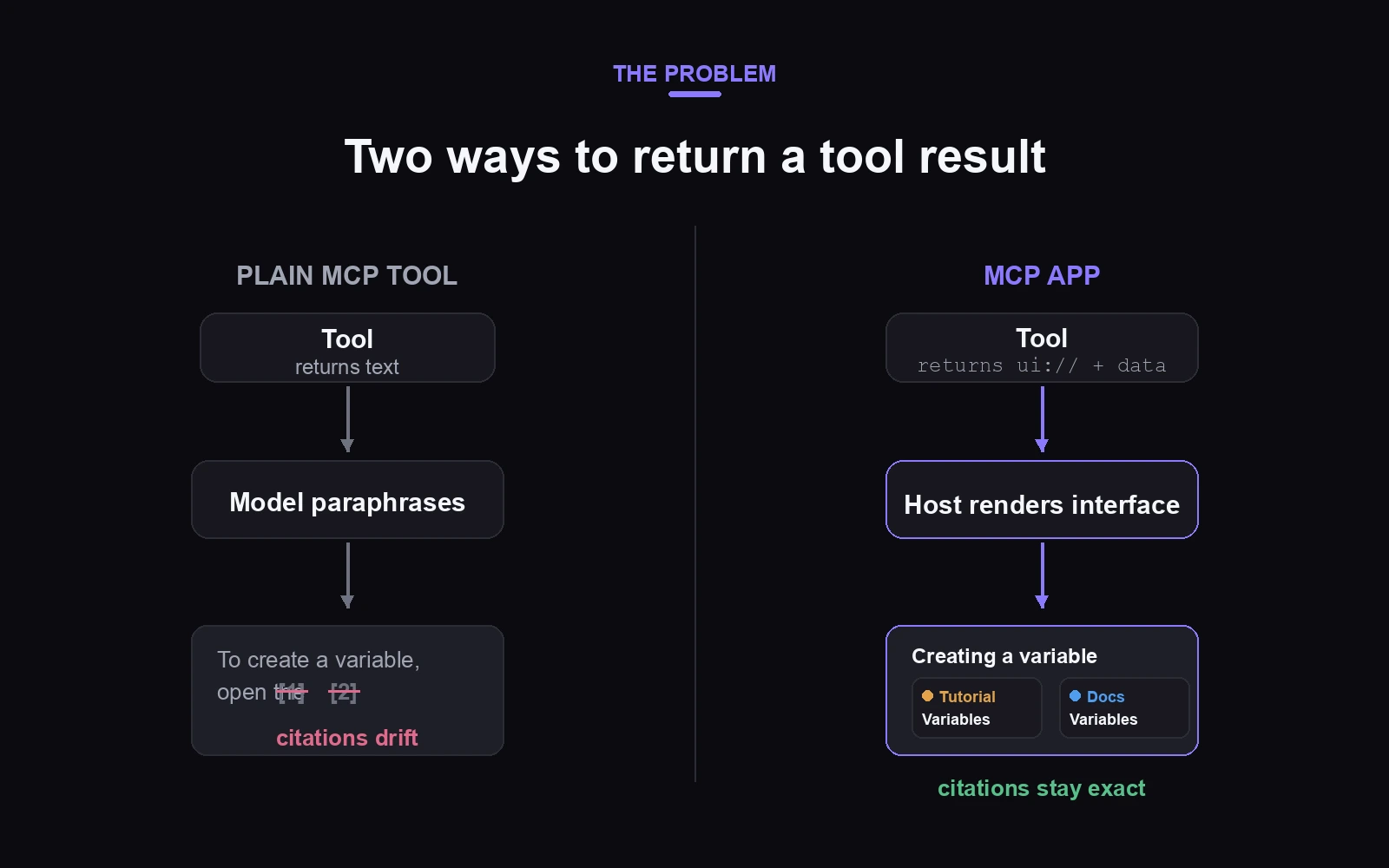
MCP standardized how models call tools: you expose a function, the model invokes it, you return text or structured JSON. This works well when the output is an answer the model should reason about. It works badly when the output has structure the user needs intact.
Our case makes it concrete. We run a multi-source RAG agent behind our documentation site. It embeds queries with OpenAI’s text-embedding-3, reranks with Jina, fuses results from four surfaces (docs, a Storybook component library, video tutorials, and a marketplace) with reciprocal rank fusion, and returns cited answers. pgvector underneath, FastAPI in front. The value is not just the answer text. It is the citation cards you can click, the tutorial video that opens at the exact second, the per-source provenance.
Wrap that as a plain MCP tool and any client can call it. Reach is a solved problem. But everything structured about the result dies in the last hop. The model reads your tool output and re-narrates it: it drops a link, merges two sources, restates a step slightly wrong. Paraphrased citations drift, and a grounded answer ends up one hop away from its grounding. For a retrieval product, that hop is the difference between “cited” and “vibes.”
How the extension actually works
The mechanic is small, which is why it composes well. Three pieces:
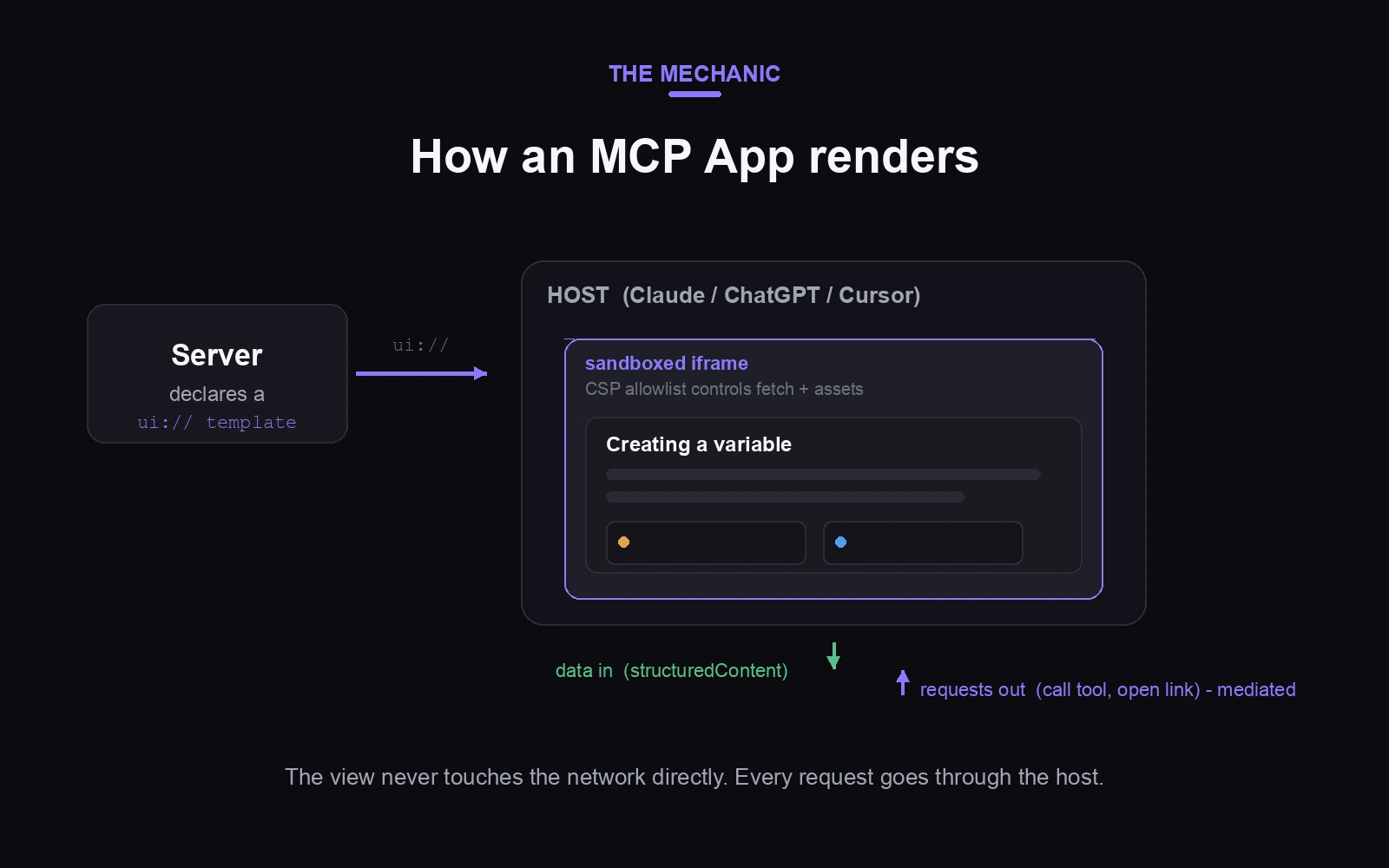
First, a tool declares a UI resource: a ui:// URI pointing at an HTML template the server ships. The template is pre-declared rather than generated per call, which matters for security. The host can inspect it before ever rendering it.
Second, when the model calls the tool, the host fetches that resource and renders it in a sandboxed iframe inside the conversation. Your tool response carries the data (structuredContent for the model and the view, optional _meta for view-only payloads the model never sees).
Third, the iframe and the host talk both ways over JSON-RPC. The host pushes tool results into the view. The view can request things from the host: call another tool, open an external link, persist state. Every one of those requests is mediated. The UI cannot fetch arbitrary URLs or invoke tools silently; network and asset access is constrained by CSP allowlists the server declares, and hosts can require user consent for UI-initiated calls.
The lineage explains the design. OpenAI shipped a proprietary version of this idea in its Apps SDK; the MCP-UI community project explored the same territory. In January 2026 the MCP maintainers, OpenAI, and MCP-UI merged those efforts into MCP Apps, the first official protocol extension, with the finalized spec landing July 2026. Claude, ChatGPT, VS Code, Goose, and Cursor have all shipped support.
One property is worth calling out because it de-risks adoption: degradation is graceful. A host that does not support Apps just ignores the UI resource and uses the text output like any normal tool. You lose the interface, not the functionality.
The model, the user, and the UI see different things
The conceptual core of building an App is what the docs call context asymmetry, and it is the part that changes how you design.
There are three participants, not two. The user sees the rendered iframe. The model sees the tool response. The UI sees its own state. None of them automatically sees the others. The model does not know what the user clicked unless the view syncs it back. The user never sees the raw structured data. The view cannot know the conversation context beyond what flows through the tool call.
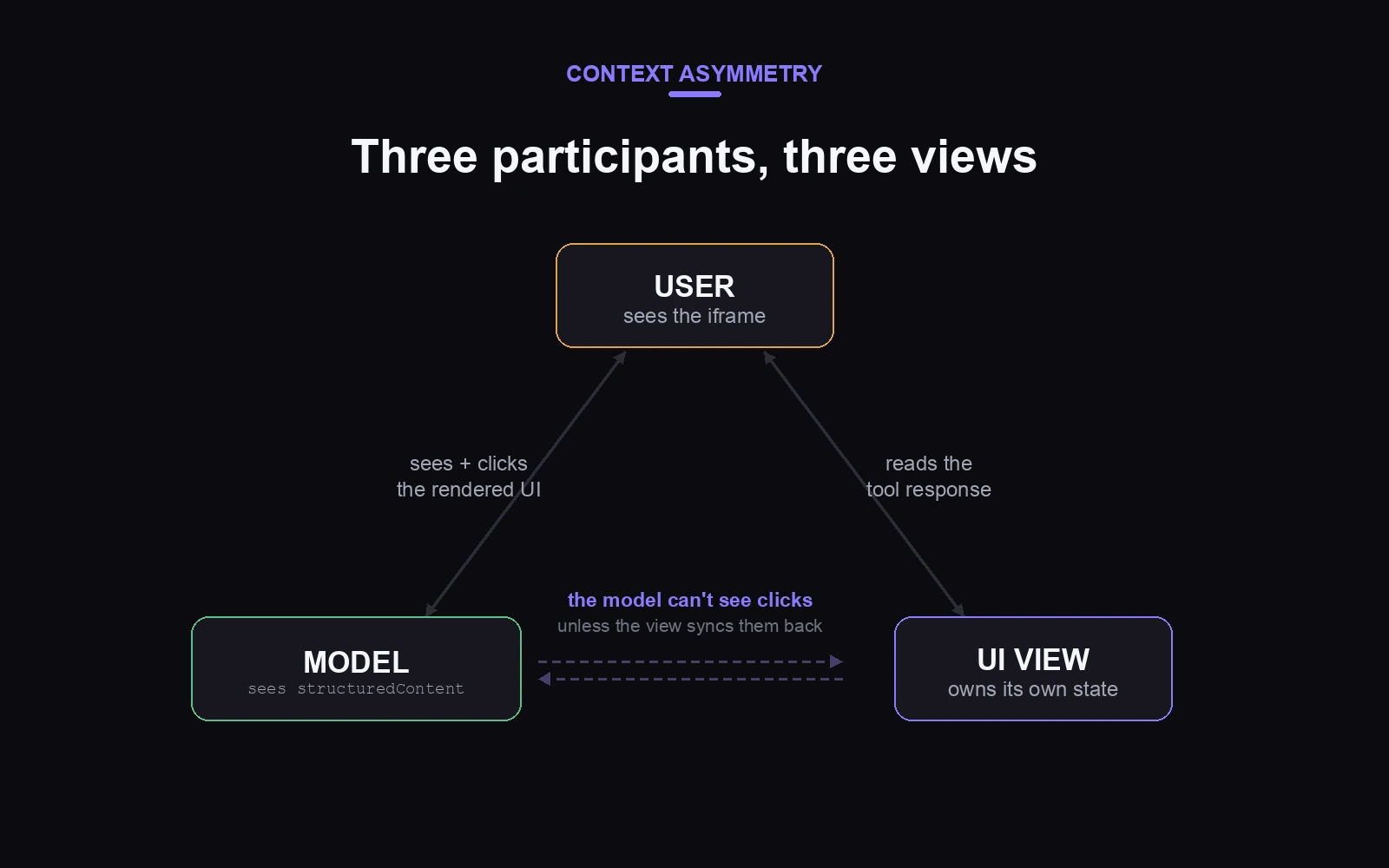
Every design decision reduces to one question: who needs to see this, and when. For a RAG answer, the model needs the full answer text so it can reason about follow-ups. The user needs the rendered version with citation cards and video thumbnails. Two outputs from one tool call, deliberately different.
Get that split wrong and the failure modes are strange, as I found out.
The case study: what we built and what broke
The architecture decision came first. Our backend is Python, and the App layer I used is TypeScript. Porting a retrieval pipeline to Node to satisfy a UI layer would be backwards, so a thin TypeScript server sits in front, owns the React view, and calls the existing FastAPI service over HTTP. The Python side did not change at all.
The tool definition is almost boring:
server.registerTool(
  {
    name: "ragSearch",
    description: "Search our docs and components and render a cited answer",
    inputSchema: { query: z.string() },
    view: { component: "rag-search" },   // this line is what makes it an App
  },
  handler,
);
My first version got the context asymmetry wrong, and it is the most instructive mistake I made. Our backend streams answers over NDJSON, so I had the widget open the connection itself and render tokens as they arrived, while the tool returned immediately with a “rendering in the panel” placeholder. It demoed beautifully.
Then I watched the model use it. Because the tool returned no real answer, the model did not believe it had one. It called the tool again with a reworded query. Then a third time. The widget rendered three times in one turn, and the model started opening the cited doc URLs on its own to recover the content my tool had withheld. My streaming had made the model blind to its own result, which is exactly the desync the three-participant model warns about.
The fix: move the backend call server-side, return the complete answer in the tool response. The model gets a real result, calls once, stops chasing links. I traded live token streaming for a model that understands what it just did. Not a close call.
Two more edges cost real time, and both are invisible in local dev:
CORS. While the widget still fetched the backend directly, everything worked locally and rendered blank everywhere else. The cause: in local dev the widget runs on localhost, which our FastAPI CORS config allowed. Every real host renders the iframe from a different origin, sometimes an opaque null one, and the browser blocked the fetch. Not the network. The browser. Moving the call server-side dissolved this whole class of problem, because a server has no origin. Where the backend call lives is the single most consequential decision in an MCP App.
Persisted view state. Hosts persist your view’s state and restore it across runs. I changed the shape of that state between versions, the restored object was missing a field the new code read, and the view crashed to blank on every render. Treat restored view state like a cache: it survives your schema changes, and nothing warns you.
The framework layer: Skybridge
You can build all of the above against the raw spec. I used Skybridge, an open-source TypeScript and React framework from Alpic, and the honest assessment is that it earns its place for two reasons.
The first is the type bridge. It infers types end to end from the tool definition to the React view, the way tRPC connects a backend to a frontend. The day I renamed a field on the tool output, every place in the view that read the old name lit up red before I ran anything. The server is the source of truth and the UI cannot drift from it quietly.
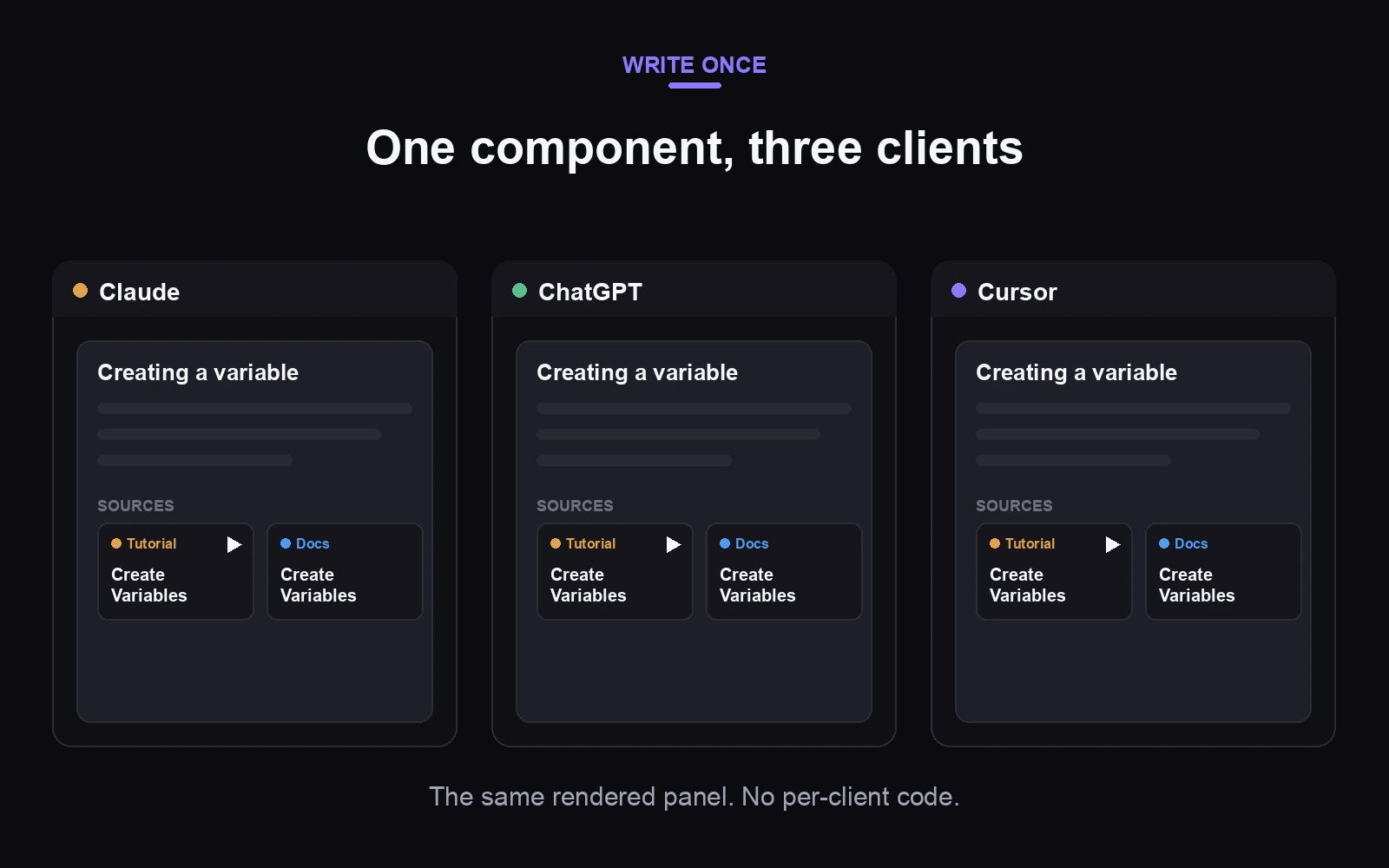
The second is that it abstracts the runtime split. ChatGPT renders Apps through its window.openai runtime; Claude, Cursor, and the rest speak the open spec. Skybridge papers over that gap, and I shipped one React component with zero per-client branches. The dev loop is good too: a local emulator, hot reload, and a tunnel for testing inside real clients while you build.
Where it leaks: there is no streaming primitive (my whole streaming misadventure was me working around that), the view-state persistence behavior is undocumented enough to bite, and small things surprise you, like a plain anchor tag doing nothing inside the sandbox. External links must go through a useOpenExternal hook that routes through the host. None of these are disqualifying. All of them are the difference between the pitch and the practice.
What I would tell you before you build one
Use a plain MCP server when your output is prose the model should absorb and re-express. Reach for an App when the output has structure that must survive contact with the model: citations, tables, media, anything clickable, anything the user interacts with after the answer lands.
If you do build one:
Put the backend call on the server, not in the widget. It keeps the model in sync with the result and makes CORS someone else’s problem. Almost everything I got wrong traces back to violating this.
Design for three participants from the start. Decide explicitly what the model sees, what the user sees, and what state the view owns. The structuredContent versus _meta split in the spec exists precisely for this.
Budget a day for the deploy-first tax. The local emulator hides origin behavior, state persistence, and host differences. Nothing counts as tested until it has rendered inside a real client.
The payoff is real. The same retrieval engine, the same cited answers, now rendering as the same interactive panel in Claude, ChatGPT, and Cursor, from one codebase. The protocol finally has a way to ship an experience instead of a paragraph. It just expects you to understand who sees what.
Get the drops in your inbox
One email when something new ships, and nothing else.